WhatsApp Native Integration & Instant Digital Invoicing
Send high-resolution PDF invoices, image snapshots, and payment receipts directly to client WhatsApp chats with zero third-party fees.
Learning Objectives
By the end of this guide, you will:
- Link your business WhatsApp account using a secure QR Code in under 15 seconds.
- Dispatch PDF Invoices and Mobile Image Snapshots with 1 click directly from sales and payment screens.
- Customize automated WhatsApp message templates with dynamic tags (Customer Name, Invoice Total, Due Date).
- Send customer Account Ledgers & Overdue Balance Statements via WhatsApp.
Why Native WhatsApp Delivery?
Key Advantages:
- Zero Additional Cost: No per-message SMS fees, no expensive third-party Twilio or Meta Business API bills.
- True Zero-Click File Attachments (Desktop Session vs.
wa.me): Standard web apps usingwa.me/phone?text=...can only prefill plain text and cannot attach files automatically. Roznamcha Digital's native desktop Electron session directly dispatches the generated PDF or JPG binary into the recipient's chat stream without requiring manual file selection. - Automatic Phone Number Normalization: The built-in number resolver (
normalizeWhatsAppPhone) strips spaces, dashes, leading zeroes, and automatically converts local numbers (e.g.0300 1234567→923001234567) based on your company's country dial code (+92Pakistan,+971UAE,+1USA,+44UK,+91India, etc.). - High-Resolution Visual Snapshots: Customers can view an instant photo preview on their phone without needing to download a PDF viewer app.
Anti-Spam & Responsible Transactional Policy
WhatsApp Account Safety & Anti-Spam Guidelines: WhatsApp enforces strict anti-spam algorithms. Roznamcha Digital's WhatsApp engine is engineered exclusively for 1-to-1 transactional documents (Invoices, Payment Receipts, Quotations, and Account Statements). Do not use this tool for unsolicited mass marketing or cold promotional broadcasting, as high spam-report rates may lead WhatsApp to temporarily restrict your phone number.
Linking WhatsApp in 15 Seconds
Navigate to Settings > WhatsApp:
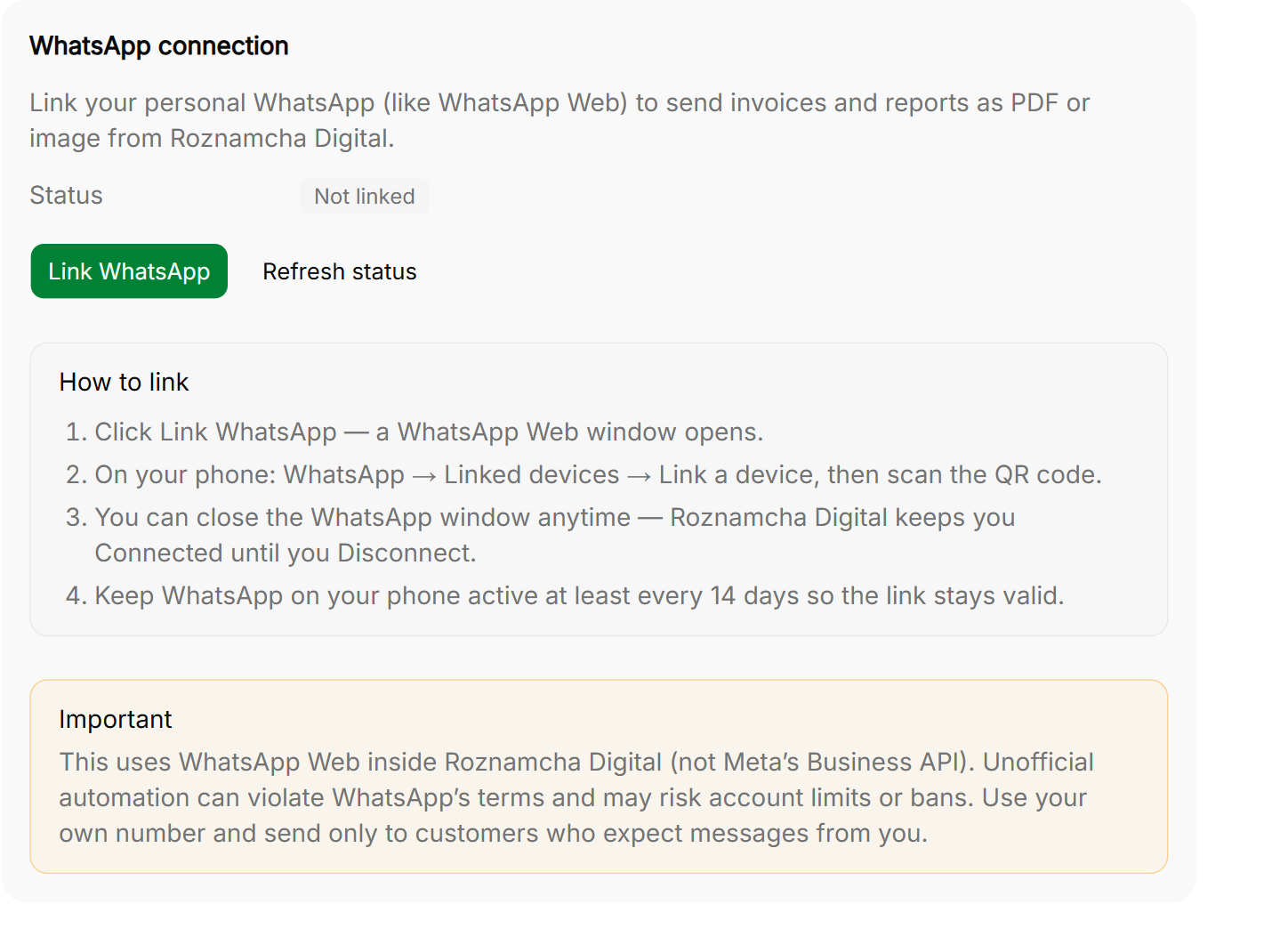
Step-by-Step Pairing:
- Open Settings > WhatsApp.
- A secure WhatsApp Web QR Code appears on your screen.
- Open WhatsApp on your smartphone, tap Settings / Linked Devices, then tap Link a Device.
- Scan the QR code on your computer screen with your phone camera.
- Done! Roznamcha Digital stores your session credentials locally on your computer in encrypted storage. You do not need to rescan every day.
Sending an Invoice via WhatsApp in 1 Click
When viewing any submitted Sales Invoice, Payment Receipt, or Customer Statement:
- Click the green Share WhatsApp button in the top action bar:
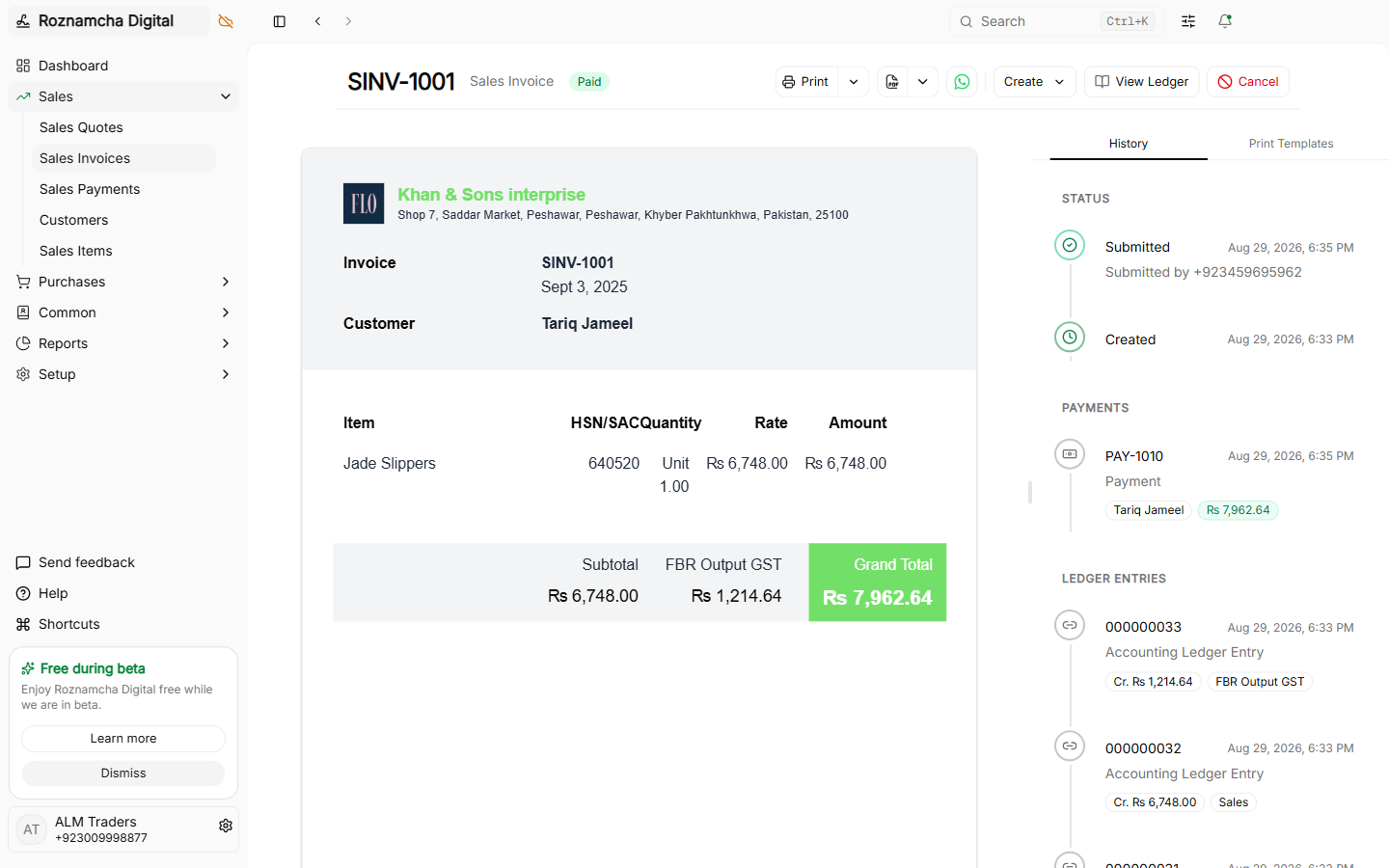
- Roznamcha Digital automatically extracts the customer's WhatsApp number and prepares a customized message:
Dear Tariq Traders,

Thank you for your business with Al-Rehman Electronics!
Your Sales Invoice #SINV-2026-0042 has been generated:

* Invoice Total: PKR 544,570.00
* Due Date: 2026-10-01
* Balance Due: PKR 544,570.00

Please find the official PDF invoice attached below.

For queries, reply to this message.- Choose your attachment mode:
- Attach High-Resolution PDF: Official multi-page printable tax invoice.
- Attach Image Snapshot (JPG): Mobile-optimized image for instant viewing in WhatsApp chat.
- Click Send Message. The document is dispatched immediately to the customer's chat!
Sending Payment Receipts & Customer Ledgers
In addition to invoices, you can share:
- Payment Receipts: Confirming payment received with remaining ledger balance.
- Statement of Accounts: Full date-filtered customer ledger showing all historical debits, credits, and closing balance.
Common Pitfalls & Best Practices
Keep Phone Connected to Internet Periodically: WhatsApp Web protocol requires your primary phone to connect to the internet at least once every 14 days to keep linked sessions active.
Format Customer Numbers with International Dial Codes:
Always save customer phone numbers with country codes (e.g., +92 300... or 971 50...) so WhatsApp links directly without dial errors.
Knowledge Check
Payments, Cash Flow & Multi-Account Banking
Master customer receipts, vendor disbursements, unallocated advances, invoice reconciliation, and bank-to-cash contra transfers.
Multi-Location Warehouses, Goods Receipts & Transfers
Manage multi-location inventory, Purchase Receipts (GRN), Delivery Shipments, Inter-Warehouse Transfers, and Stock Adjustments.