Double-Entry Bookkeeping & Chart of Accounts Architecture
Master the 5 root account types, double-entry debit and credit rules, tree hierarchy, and custom ledger configuration in Roznamcha Digital.
Learning Objectives
By the end of this guide, you will:
- Understand the fundamental Accounting Equation and double-entry debit/credit mechanics.
- Master the 5 Root Account Groups in Roznamcha Digital (Assets, Liabilities, Equity, Income, Expenses).
- Distinguish between Group Accounts (folders) and Ledger Accounts (postable accounts).
- Create, edit, and organize custom accounts in the interactive Chart of Accounts tree view.
- Review real-world double-entry journal postings behind common business transactions.
Double-Entry Bookkeeping Simplified
The Fundamental Accounting Equation: Assets = Liabilities + Equity
Every financial event impacts at least two accounts in equal measure. Total Debits must always equal Total Credits:
Total Debits (Dr) = Total Credits (Cr)
The Universal Debit & Credit Rule
| Account Type | Normal Balance | To INCREASE Account Value | To DECREASE Account Value |
|---|---|---|---|
| Assets (Cash, Bank, Receivables, Stock) | Debit | DEBIT (+) | CREDIT (-) |
| Expenses (Rent, Salaries, Electricity, COGS) | Debit | DEBIT (+) | CREDIT (-) |
| Liabilities (Payables, Loans, Taxes Payable) | Credit | CREDIT (+) | DEBIT (-) |
| Equity (Capital, Retained Earnings) | Credit | CREDIT (+) | DEBIT (-) |
| Income / Revenue (Sales, Service Income) | Credit | CREDIT (+) | DEBIT (-) |
The 5 Root Account Groups
Roznamcha Digital organizes your financial world into a logical tree structure:
Group Accounts vs. Ledger Accounts
In Roznamcha Digital, an account is either:
- Group Account: Acts like a folder. It cannot accept direct transactional postings. Instead, it aggregates the balances of all its child accounts (e.g. Current Assets or Operating Expenses).
- Ledger Account: A postable account that directly records transactions (e.g. Meezan Bank Current A/C, Sales - General, or Office Electricity Expense).
The Interactive Chart of Accounts Tree
Navigate to Master Data > Chart of Accounts (or press Ctrl+K and type Chart of Accounts):
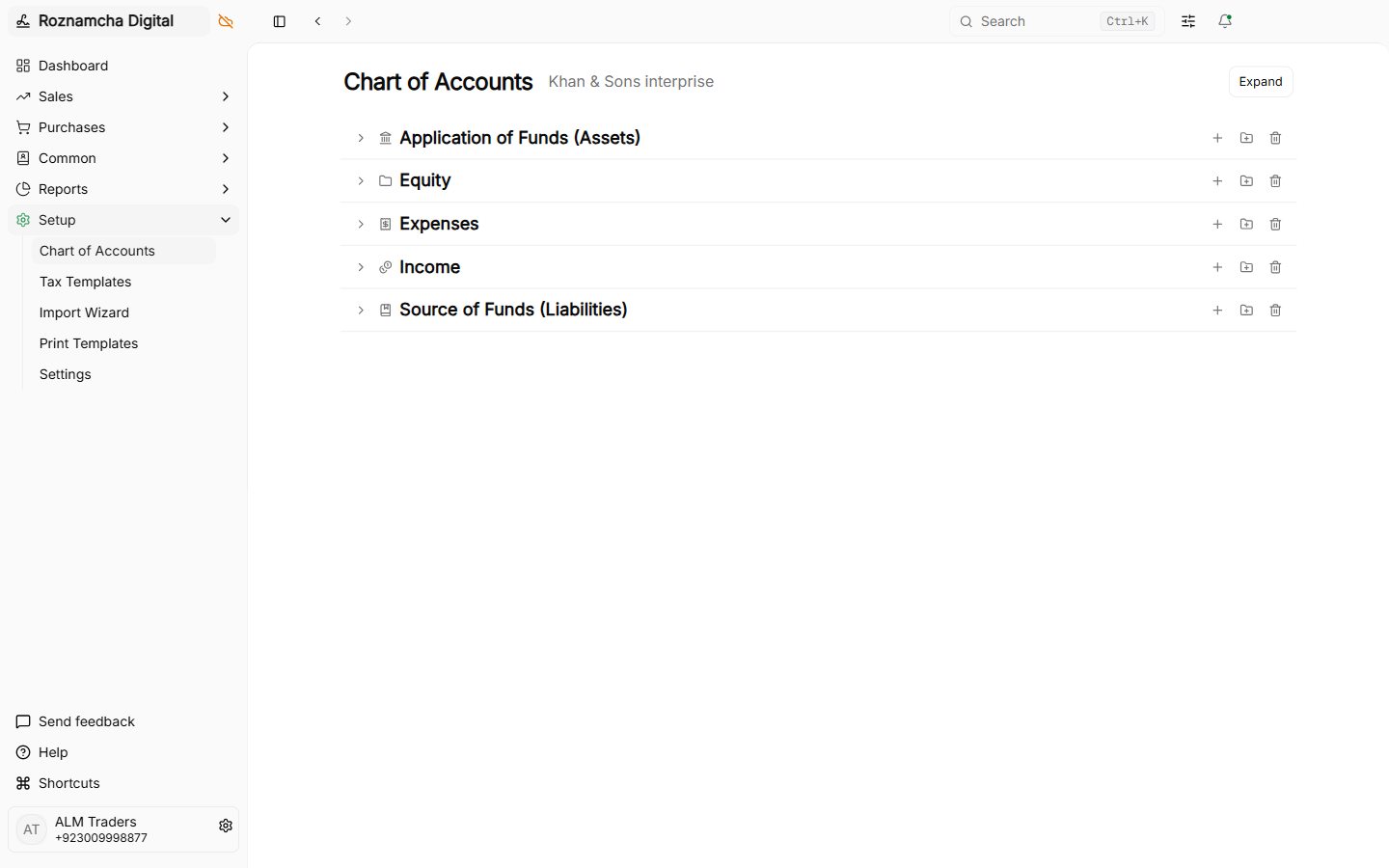
Steps to Add a New Custom Account:
- In the tree view, click on the Parent Group where the new account belongs (e.g., click 1120 Bank Accounts).
- Click + Add Child Account in the side drawer.
- Enter the Account Name (e.g., Bank Alfalah Business A/C).
- Select the Account Type:
BankorCash(for liquid payment accounts)Receivable(for customer debtors)Payable(for supplier creditors)Tax(for sales tax / withholding ledgers)Cost of Goods Sold(for inventory COGS)Expense Account/Income Account(for general revenue or expenses)
- Choose whether this is a Group (folder) or Ledger (postable) account.
- Click Save. The new account appears in the tree immediately.
Real-World Scenario: Behind the Scenes of a Cash Sale
Scenario: You sell PKR 50,000 of electronics for instant cash.
When you click Submit on the Sales Invoice, Roznamcha Digital automatically generates the following double-entry transaction in the General Ledger:
| Account Name | Account Type | Debit (PKR) | Credit (PKR) |
|---|---|---|---|
| Cash in Hand | Asset (Increased) | 50,000.00 | — |
| Sales Revenue | Income (Increased) | — | 50,000.00 |
| TOTALS | 50,000.00 | 50,000.00 |
Result: Your Cash in Hand asset increases by 50,000, and your Sales Revenue increases by 50,000. The equation remains in perfect balance.
Common Pitfalls & Best Practices
Never Post Direct Journal Entries to Control Accounts Without Specifying the Party: When debiting Accounts Receivable or crediting Accounts Payable in a manual journal, always attach the corresponding Customer or Supplier name so their individual sub-ledger updates correctly.
Use Numbered Account Codes for Large Organizations:
Enable account numbers (e.g. 1110, 1120, 2110) in settings if your accountant uses standard numerical ledger codes for filing.
Knowledge Check
Plans, Billing & Signed-in Devices
Choose Business, Enterprise, or Custom, pay a prepaid period with SafePay, set your account photo, and sign out other devices.
Customer & Vendor Master Data, Item Catalog & Regional Taxes
Configure Customers, Suppliers, Item Catalog, Price Lists, Units of Measure, Barcodes, and Regional Tax Templates (FBR GST, PRA, SRB, VAT).